HTTP Client: Request
Perform an HTTP request.
Input
Parameters
Inject dynamic parameters in your base url. Each URI parameter produces a required input connector accepting a plain text or integer value.
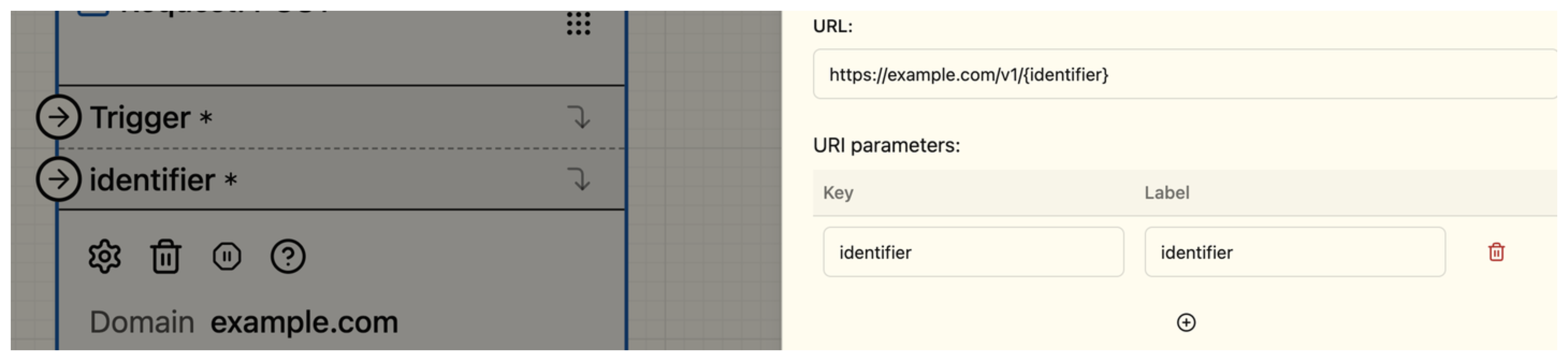
Url: https://example.com/v1/{identifier}
Injected "identifier": hello
-> generated url will be https://example.com/v1/hello
Handle query parameters in your url. If Dynamic is checked you will be able to inject it as a connector in your function input.
A dynamic parameter with a filled Value produces an optional connector: when
nothing is wired (or no value flows in), the configured value is used as a
fallback. A dynamic parameter without a value produces a required connector.
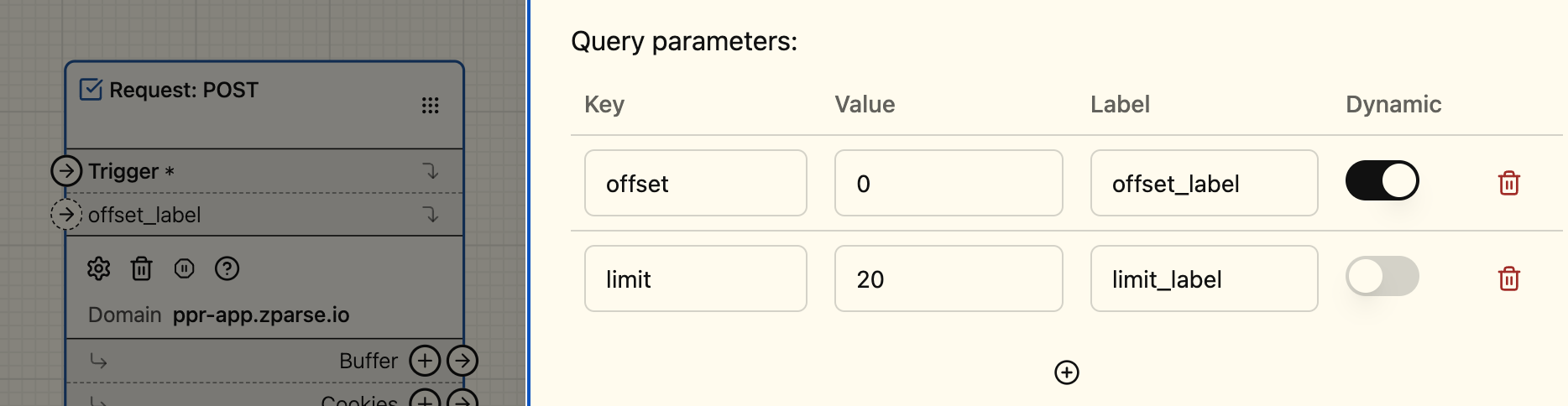
Url: https://example.com/v1/hello
Query params:
  - offset | 0 | offset_label | dynamic
  - limit | 20 | limit_label

Injected "offset": 10
-> generated url will be https://example.com/v1/hello?offset=10&limit=20
Add given configured body to the request.
- Text: Add given text to body
- Json: Add given JSON to body
- Form: Add given form to body (in JSON representation)
- Dynamic (Text | Json | Form | File | File in body): Allow reception of the body from an input connector
- Text: raw text sent as the request body
- Json: JSON body (the connector also accepts a File, parsed as JSON)
- Form: URL-encoded form built from a key/value map
- File: file sent as
multipart/form-dataunder the part namefile - File in body: file content sent as the raw request body;
Content-Typeis guessed from the filename unless aContent-Typeheader is configured on the node
- Text: hello
- Json: {"hello": "world"}
- Form: {"hello": "world"}
- Dynamic -> retrieved from input connector
Add given headers to your request. If Dynamic is checked you will be able to inject it as a connector in your function input.
A dynamic header always produces a required plain text connector; its configured
Value, if any, is only used as a fallback when the wired input does not
carry a usable text value.

Url: https://example.com/v1/hello
Query params:
  - Header-1 | Hello
  - Header-2 | World | Dynamic

Injected "Header-2": France
-> generated request will be https://example.com/v1/hello -H 'Header-1: Hello' -H 'Header-2: France'
In which format to expect the response.
- Text: Retrieve body as a simple text
- Json: Retrieve body as a valid JSON (fails if the body is not valid JSON)
- File (default): Retrieve body as a file, without decoding
Which responses code to accept (default is 200). See HTTP codes list.
Per-request timeout in seconds (timeout_sec). Default is 30 s, maximum
is 120 s — configurations with a higher value are rejected.
When checked, invalid TLS certificates are accepted
(accept_invalid_certs). Available on GET, POST, PUT and PATCH clients.
Use only for test environments — never in production.
When checked, a 429 Too Many Requests response is retried up to 3
times, with a flat 300 ms pause between attempts.
Output
Based on response type configuration (cf. Parameters > Response Type):
the body is emitted on the plaintext, json or file connector
respectively.
Cookies set by the server, see function: Extract Cookie Value to
retrieve specific value.
Headers set by the server, see function: Extract Header Value to
retrieve specific value.